Please register to participate in our discussions with 2 million other members - it's free and quick! Some forums can only be seen by registered members. After you create your account, you'll be able to customize options and access all our 15,000 new posts/day with fewer ads.
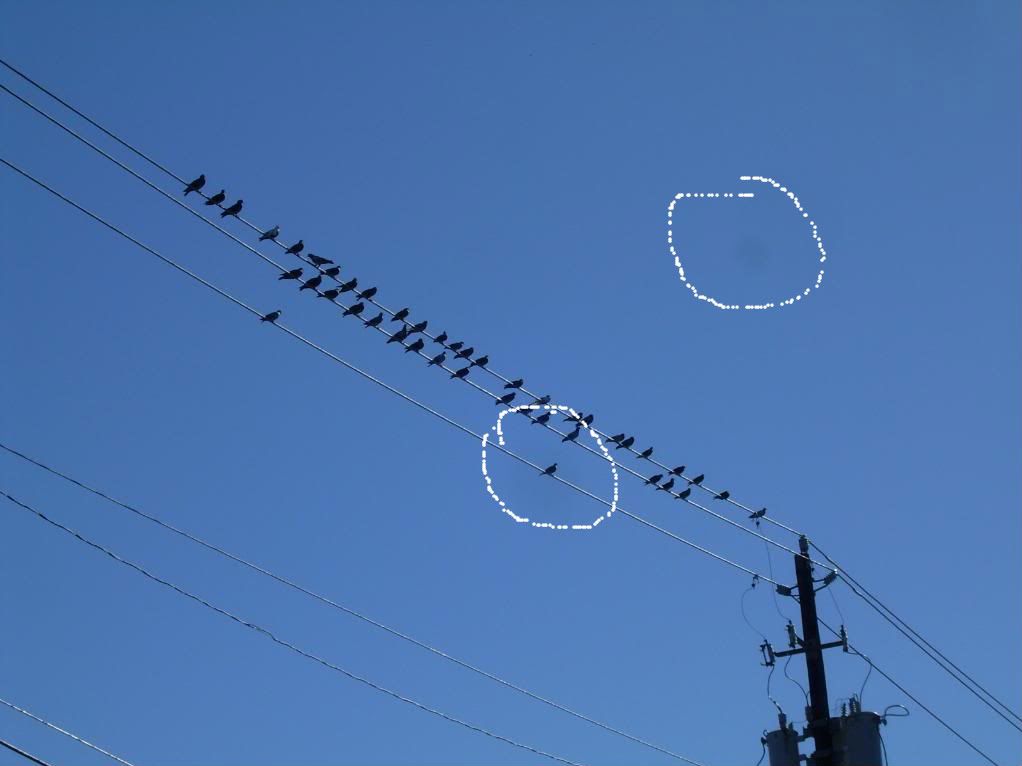
Just seeing if anybody could tell me what's going on, and why. I really don't expect it to be fixed, whatever it is, nor am I going to spend anything on fixing a four-year-old point and shoot. (Nikon Coolpix L4)
See the dark spots? If you can't, let me circle them...
I've noticed them when I shoot something at full zoom (3x). Going back I can see them in a lot of shots I've taken in the last year or so. First I thought my lens needed cleaning, but I did that and they're still there. I notice they don't show when I'm zoomed out. Is something warped in there?
with digital that is almost a normal thing. its dust...
i use the gito rocket blower all the time and have always had success with most of the dust but there are 1 or 2 spots like yours that will require wet cleaning to remove. i wont do that myself.
most good editing software has a healing brush that will cover those spots in the blink of an eye so they never appear in my photos.
in fact nikon capture nx2 software and nikon dslr's can actually map the effected pixels and automatically remove the spots from your photos by cloning out the marks
yeah, not common for a point and shoot... for most of us serious photographers we have software that deals with it very easily but you generally have to buy it.
I was reading a photography book that talked about parts of a sensor going bad causing dead spots in the picture frame. Anyone think that could be the case ?
you never know but it does look more like stubborn dust, i have the same marks in my d80 and d300
Please register to post and access all features of our very popular forum. It is free and quick. Over $68,000 in prizes has already been given out to active posters on our forum. Additional giveaways are planned.
Detailed information about all U.S. cities, counties, and zip codes on our site: City-data.com.

 Please register to participate in our discussions with 2 million other members - it's free and quick! Some forums can only be seen by registered members. After you create your account, you'll be able to customize options and access all our 15,000 new posts/day with fewer ads.